What to Look for in WhatsApp Business API Platforms If You Care About Unified Team Inbox
Three agents answering one WhatsApp number means nobody knows who replied last. That confusion costs you duplicate messages, missed follow-ups, and customers repeating themselves across Messenger, Instagram, and web chat. Picking the wrong WhatsApp Business API platform locks that mess into your workflow for years.
This article breaks down what actually separates a real unified team inbox from a shared login: assignment logic, collision detection, bot-to-human handoffs, CRM sync, and Meta Business Partner status. You will also see how Com.bot handles channels, automation, and pricing, so you can compare platforms against criteria that matter.
Why the Unified Team Inbox Is the Real Differentiator
A unified team inbox is not just a shared email alias. It is the operational hub where every customer conversation across WhatsApp, Messenger, Instagram, and web chat converges into a single, actionable stream.
Most platforms advertise channel integrations as the headline feature. But connecting WhatsApp to a dashboard means little if conversations still live in separate agent logins. The real advantage comes from channel consolidation paired with shared access.
When a WhatsApp Business API platform treats the unified team inbox as its core, it creates a single source of truth for customer interactions. Silos disappear. Handoffs get cleaner. Managers can see workload across the whole team instead of guessing.
That is why the inbox, not the integration list, deserves the closest scrutiny during evaluation. The following subsections explain what separates a genuinely unified workspace from a rebranded collection of disconnected message threads.
Shared visibility vs. siloed agent logins
When each agent logs into separate channel accounts, conversations become invisible to the rest of the team, leading to duplicated responses, missed follow-ups, and frustrated customers.
Consider a typical scenario. A customer messages on WhatsApp about a delayed order, then follows up on Instagram an hour later. If the Instagram agent cannot see the WhatsApp thread, that agent lacks context. The customer repeats everything, and the experience feels disjointed.
A shared inbox solves this. Every message thread is visible to the whole team, and any conversation can be assigned to a specific agent. Conversation assignment replaces the question of who happened to be logged in when a message arrived.
Shared visibility also enables workload balancing. Supervisors can see who is buried and who has capacity, then route new conversations accordingly. Teams using shared inboxes tend to reduce response duplication.
Faster resolution follows naturally. When an agent goes offline, a colleague picks up the thread with full conversation history intact. No customer ever has to start over, and no message sits unanswered because it landed in the wrong person's queue.
When evaluating a WhatsApp Business Solution Provider, ask directly: can every agent see every conversation by default? If the answer requires workarounds, the inbox is not truly unified.
How inbox quality affects response time and CSAT
Inbox quality directly impacts two critical metrics: first response time and customer satisfaction (CSAT), because a disorganized inbox forces agents to hunt for information instead of helping customers.
A well-structured agent workspace surfaces context immediately. Previous conversations, contact details, order history, and open tickets appear alongside the active message. The agent replies with knowledge rather than questions.
Speed alone is not enough. An agent who responds in seconds but lacks context delivers a fast, poor answer. Inbox quality must include context retention, meaning conversation history and contact management travel with the thread across channels and across agents.
Support industry benchmarks suggest that meaningful reductions in first response time can lift CSAT substantially. The exact figures vary by industry, but the direction is consistent.
Actionable ways to improve inbox quality include:
- Saved replies for common questions, so agents start from a strong draft
- Tags for topic, priority, and customer segment, making sorting and reporting easier
- Priority sorting that pushes urgent or at-risk conversations to the top
- Clear escalation paths so complex threads reach the right specialist quickly
Message routing rules matter here too. A platform that routes by skill, language, or availability keeps conversations moving without manual triage. Combined with CRM integration and a ticketing system, the inbox becomes the place where conversational support and back-office records meet.
During evaluation, test how the inbox behaves under pressure. Load it with overlapping conversations from multiple channels and watch whether context, assignment, and history hold together. That stress test reveals more about inbox quality than any feature list.
Core Capabilities to Evaluate in a Unified Inbox
Not all unified inboxes are created equal. The best ones offer advanced capabilities that streamline teamwork, maintain context, and ensure seamless automation.
Basic shared inboxes typically merge messages into one view and little else. True omnichannel platforms go further with routing logic, customer profiles, and automation that carries data forward.
When evaluating WhatsApp Business API platforms, treat these capabilities as the dividing line between a simple messaging hub and a genuine customer communication platform. The sections below break down what each one should deliver.
Multi-agent assignment, collision detection, and internal notes
Without collision detection, two agents might reply to the same customer simultaneously, creating confusion and undermining trust. This single flaw is one of the most common reasons shared inboxes fail at scale.
Conversation assignment usually works in one of three ways. Manual assignment lets a supervisor pick an owner. Round-robin routing distributes new chats evenly across available agents. Skill-based routing sends conversations to agents with the right expertise, such as billing or technical issues. Many teams combine all three depending on queue volume.
Collision detection complements routing by locking a conversation the moment an agent opens it. Other team members see who is handling it and cannot send a duplicate reply. This protects the customer experience and makes accountability clear.
Internal notes are private comments attached to a conversation and visible only to team members. They matter most during escalation. For example, an agent can note that a customer is requesting a refund and flag the order details before reassigning the thread to a supervisor. The next person picks up with full awareness instead of asking the customer to explain again.
Look for a platform where assignment rules, locking behavior, and notes all live inside the same agent workspace. When these tools sit in separate systems, errors and duplicated effort creep back in.
Full context across WhatsApp, Messenger, Instagram, and web chat
Customers expect you to know their history regardless of which channel they used last, so a unified inbox must stitch together conversation threads from WhatsApp, Messenger, Instagram, and web chat into a single customer profile.
This is where channel consolidation proves its value. Each contact should have one record that shows every past interaction, including message threads, order references, and prior resolutions. Contact management and conversation history are not add-ons. They are the foundation of conversational support.
Consider a typical scenario. A customer asks about an order on WhatsApp, then follows up a day later on Instagram. With a properly synchronized inbox, the agent opens the profile and sees the entire exchange immediately. Without it, the customer repeats the order number and the agent guesses at context.
That repetition damages CSAT quickly. Customers tend to rate support lower when they have to restate information they already provided. It also lengthens handling time and increases the chance of contradictory answers across channels.
When comparing platforms, test how profiles merge. Ask whether a new message from an unknown channel automatically links to an existing contact, or whether someone has to merge records by hand. Inbox synchronization across channels should be automatic, not a manual chore.
Automation handoff: bots to humans without losing conversation history
A chatbot that cannot pass context to a human agent creates a disjointed experience, forcing customers to start over. The handoff, not the bot itself, is often what determines whether automation helps or hurts.
The ideal escalation works like this. A bot collects details such as an order number, issue category, or preferred contact time. When it hands the conversation to a person, the agent sees the full bot transcript and all collected data in the same thread. Nothing is lost and the customer never repeats themselves.
This directly reduces handling time. Agents skip the discovery phase and move straight to resolution, which improves both speed and consistency.
Best practices for a clean handoff include:
- Set clear escalation triggers, such as sentiment analysis, specific keywords, or repeated failed intents
- Have the bot pass a short summary alongside the raw transcript
- Tag the conversation with the issue category so routing sends it to the right queue
- Keep the bot and human conversation in one continuous thread
Platforms with native bot builders tend to handle this more reliably than setups where automation runs in a separate tool. When the bot and the agent workspace share the same data layer, context transfer is built in rather than bolted on. Treat this as a key differentiator during evaluation, and ask vendors to demonstrate an actual escalation from bot to agent.
Integration and Scalability Checks
A unified inbox must fit into your existing tech stack and scale as your business grows, so integration and scalability are non-negotiable. A WhatsApp Business API platform that lives in isolation creates more work than it removes.
Integration determines whether agents can see customer data without leaving the inbox. Scalability determines whether the platform holds up when message volumes climb during promotions, seasonal peaks, or rapid team growth.
Evaluate both before committing. Ask what native connectors exist, how data flows between systems, and what happens when your daily conversation count doubles or triples. A platform that works for a five-person team may struggle at fifty agents without the right architecture behind it.
CRM, helpdesk, and ecommerce sync
Without native integrations, agents waste time switching between tabs to look up customer data or update records. That friction adds up across every conversation and slows down the entire team.
Look for connectors to the systems you already run. Common categories include:
- CRM platforms such as Salesforce or HubSpot, so contact details and deal stages stay current
- Helpdesk and ticketing software like Zendesk or Freshdesk, so conversations become trackable tickets
- Ecommerce systems such as Shopify or WooCommerce, so order history and fulfillment status are visible in the thread
Two-way data flow matters more than one-way sync. When a customer's profile, recent orders, and open ticket status update automatically in both directions, agents work from a single source of truth.
The payoff is practical. Seeing a customer's recent orders directly inside the inbox helps agents resolve questions faster and with fewer transfers. Fewer tab switches also mean less chance of updating the wrong record or missing context during an agent handoff.
If your stack includes a custom or niche tool, check whether the platform offers an open API. A documented API lets your developers build the connection yourself, which protects your investment as your setup evolves. Also confirm how often sync runs, since near real-time updates matter for high-volume conversational support.
Bulk messaging, order updates, and payment flows inside the inbox
Modern unified inboxes go beyond reactive support. They enable proactive communication like bulk notifications, order updates, and even payment collection within the chat.
These capabilities turn a messaging hub into a revenue and retention tool. Consider three common use cases:
- Bulk messaging for promotions, restock alerts, or service announcements sent to opted-in audiences
- Automated order updates triggered by ecommerce events such as payment confirmation, shipping, or delivery
- Payment flows where an agent or automation sends a payment link, or the customer completes a transaction natively in the thread
Each one reduces inbound support load while creating new touchpoints. Order updates cut down on "where is my order" tickets. Payment links shorten the path from conversation to completed sale.
Compliance deserves equal attention. Bulk messages on the WhatsApp Business Platform require explicit opt-in, and templates must follow Meta's rules. A platform that helps you manage consent, template approval, and opt-out requests protects your sender quality rating.
Ask how the platform handles message routing for these flows, whether automations can hand off to a live agent mid-thread, and whether conversation history stays intact across the whole journey. That continuity is what separates a true customer communication platform from a simple broadcast tool.
Compliance, Security, and Official API Status
Compliance and security are paramount when handling customer conversations, especially on official channels like WhatsApp. A unified team inbox concentrates sensitive customer data in one place, which raises the stakes for every platform decision you make.
Before comparing features, confirm three things: the provider holds official API status, its security practices match your industry obligations, and its pricing is fully transparent. Get any of these wrong and the consequences range from sudden account bans to legal exposure.
The sections below cover what to verify and the questions worth asking before you commit.
Meta Business Partner verification and encryption standards
Using an unofficial API provider can lead to account bans and data breaches, so verifying Meta Business Partner status is critical. Official status means the provider has been approved by Meta, holds direct access to the WhatsApp Business API, and operates within Meta's policies. A WhatsApp Business Solution Provider without that approval puts your number and your message history at risk.
Encryption deserves equal scrutiny. Messages should be protected in transit and at rest, and your provider should be able to explain exactly how that works. For a shared inbox, this matters even more because multiple agents access the same conversation threads and customer context.
Com.bot is an Official Meta Business Partner and offers enterprise security with end-to-end encryption, which addresses both the compliance and data protection sides of this requirement.
Use this checklist when evaluating any provider:
- Verify partner status directly on Meta's official partner directory, not just on the vendor's own website.
- Ask which encryption protocols protect messages in transit and data at rest.
- Confirm the platform supports GDPR and CCPA obligations if you serve customers in those regions.
- Ask how access controls work across your agent workspace, including multi-agent access and conversation assignment permissions.
- Request documentation on data retention and deletion policies for conversation history.
If a vendor hesitates on any of these points, treat it as a warning sign rather than a minor gap.
Pricing transparency: per-agent, per-channel, and add-on costs
Hidden fees and unclear pricing models can turn a promising unified inbox into a budget nightmare, so demand transparency. Most WhatsApp Business API platforms price in one of three ways: per agent, per channel, or flat tiered plans. Each model shifts costs differently as your team or channel count grows.
Add-on costs are where budgets quietly break. Extra channels, additional team members, and message overages often sit outside the headline price. Ask for a detailed written quote that lists every line item, then calculate total cost of ownership across a full year rather than a single month.
Watch for setup fees, onboarding charges, and per-message markups. Some platforms also offer quarterly or annual discounts, so it pays to ask about billing cycles before signing.
Com.bot publishes its pricing openly. Plans run quarterly in USD: Silver at $149, Gold at $349, and Platinum V1 at $2500. Gold is marked as the recommended option.
Add-ons cost $10 per month each for an additional team member, a social channel, external actions per 5000, bot triggers per 25000, or an ecom store. WhatsApp messaging is billed at actual Meta rates with no markup, and dedicated support is available at $49 per hour for WABA, CRM, and Inbox, or $99 per hour for Ecommerce, Bots, and Automations.
That level of detail is what transparency should look like. When comparing platforms, put every quote side by side and check whether the messaging rate includes a margin. A low subscription with a marked-up per-message fee can cost far more than a higher flat plan once volume grows.
How Com.bot Approaches the Unified Team Inbox
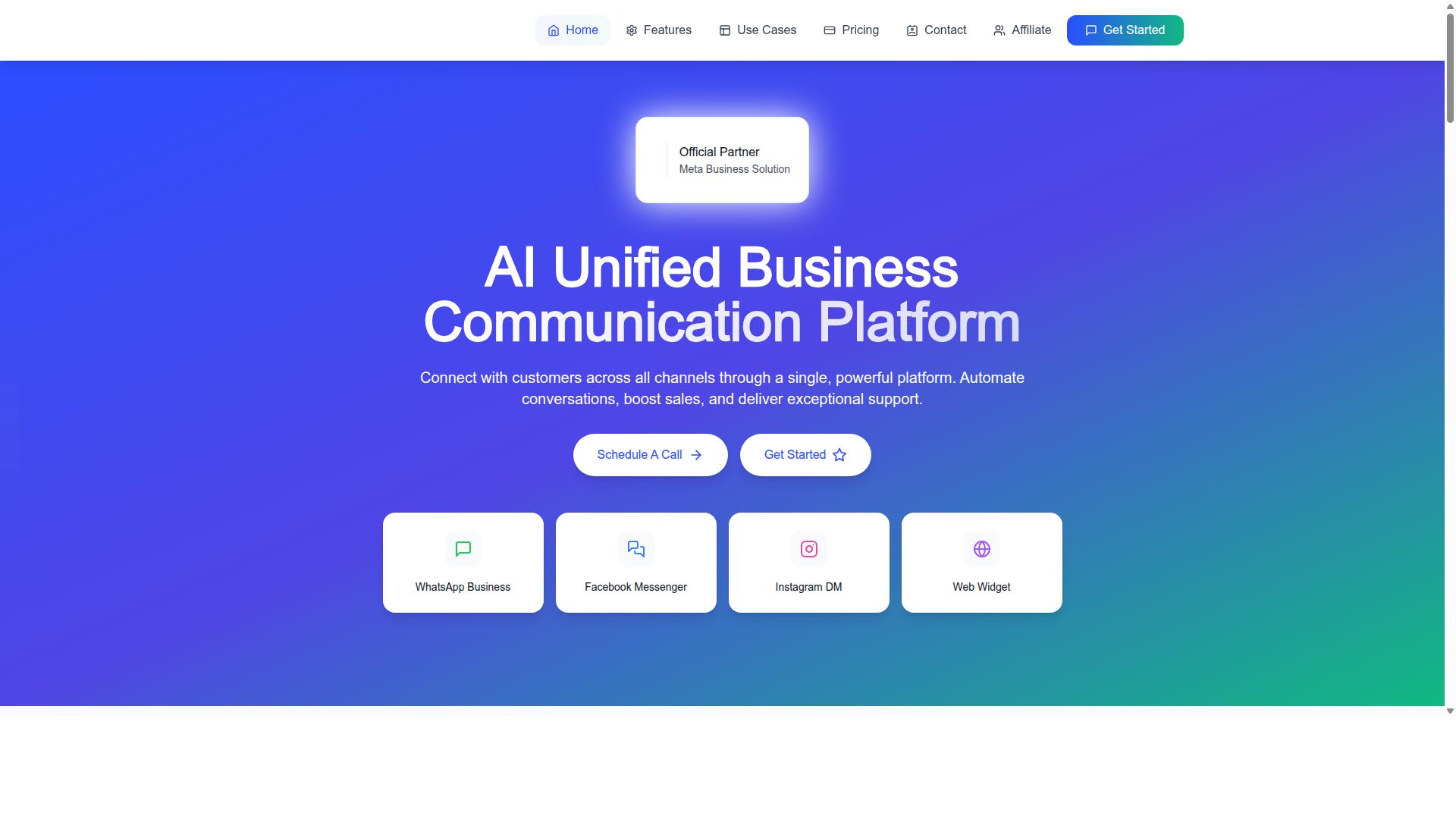
Com.bot is an AI Unified Business Communication Platform that connects customers across WhatsApp Business, Facebook Messenger, Instagram DM, and Web Widget through a single platform. That design reflects the priorities covered above: channel consolidation, shared visibility, and automation working alongside human agents rather than replacing them.
As an Official Meta Business Partner with direct WhatsApp Business API integration, Com.bot sits in the category of platforms that connect to the WhatsApp Business Platform through approved routes rather than workarounds. The platform is owned and managed by Com Bot AI Limited, and its feature set includes a unified team inbox, a visual bot builder, native payments for WhatsApp transactions, and team collaboration with role-based access.
The sections below outline how those pieces fit together, including the channels supported, the automation options available, and the pricing tiers published by the brand.
Channels, automation, and pricing at a glance
Com.bot supports WhatsApp Business API, Facebook Messenger, Instagram DM, and Web Widget, all managed from a unified team inbox with a visual bot builder and native payment capabilities. For teams evaluating a WhatsApp Business Solution Provider, that combination covers the core requirements: multi-channel reach, a shared agent workspace, and automation that runs inside the same environment as human conversations.
Key capabilities include:
- Unified Team Inbox for WhatsApp, Facebook, and Instagram conversations in one place
- Visual Bot Builder with a drag-and-drop interface for smart chatbots and automation
- Native Payments for WhatsApp transactions, plus payment collection and order updates
- Bulk Messaging, notifications, and customer support workflows
- Automation Builder with 1000+ integrations, plus external integration options
- Team Collaboration with role-based access for multi-agent environments
Pricing is published in quarterly tiers. Silver is $149 per quarter, Gold is $349 per quarter, and Platinum is $2500 per quarter. Add-ons are available at $10 per month for items such as an additional team member or an additional social channel.
The brand also offers related platforms: Tasks.Bot for enterprise-grade task automation, Tickets.Bot for event ticketing, and Calendars.Bot for AI appointment booking. Teams that need a demonstration or want to discuss enterprise security requirements can contact Com.bot sales directly.
Recommended Resources: